

Our next guest is Vlad Khambir.
He is a Principal Associate iOS Engineer at Capital One and an Independent Contributor. Vlad is not an indie developer, but he is actively build side projects and publish The iOS Weekly Brief, a weekly iOS newsletter read in over 80 countries. He also teach “Swift UI for Beginners” on Udemy and contribute to the open source RxSwiftCommunity.
What’s your workspace like?
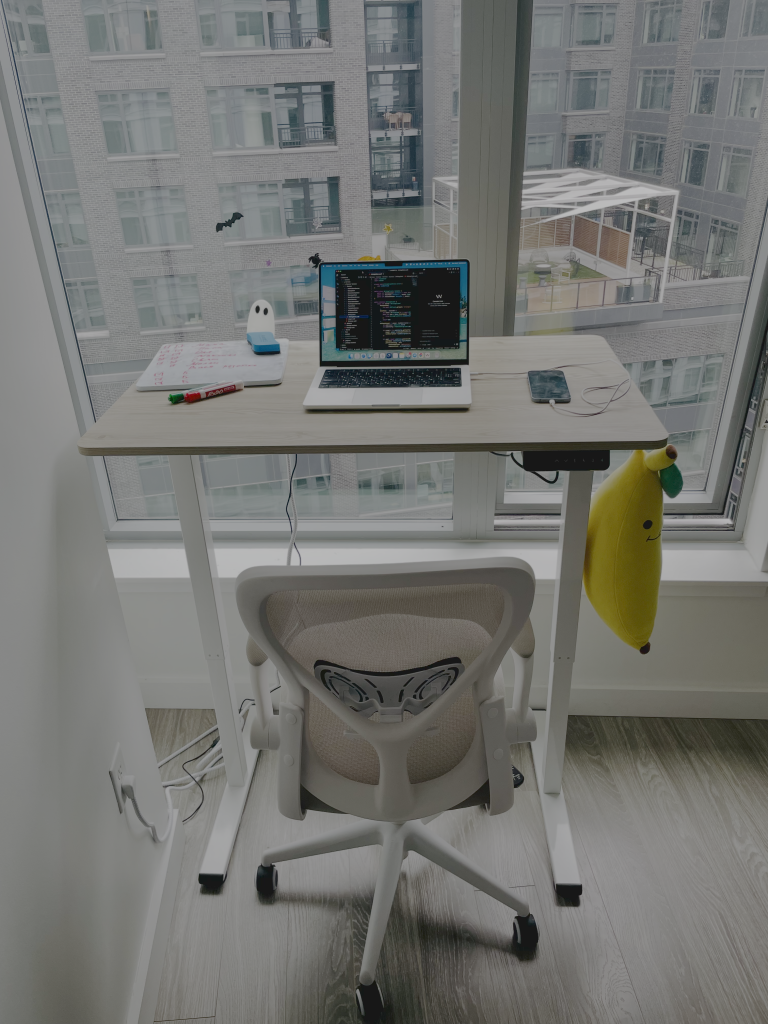
What devices and gadgets do you use in your daily work?
I keep my setup minimal. My main device is a MacBook Pro, which I use for everything: coding, testing, design, and content creation. I don’t use external monitors or keyboards; I prefer to stay mobile and keep my workspace clutter-free. The only extra item I rely on daily is a height-adjustable standing desk, which helps me switch positions and stay productive during long sessions. I also keep a whiteboard with markers nearby, it’s perfect for sketching app flows, brainstorming ideas, or quickly visualizing new concepts.
What applications and tools do you use?
Here are my top 5 essential tools that help me stay productive and organized while developing:
1. ChatGPT: My daily coding assistant for explaining code, brainstorming solutions, and speeding up documentation.
2. Notion: For organizing ideas, product specs, and tracking progress across personal and team projects.
3. Windsurf: My go-to AI-powered IDE that helps me iterate and refactor faster.
4. Alfred: Boosts efficiency with custom shortcuts, snippets, and quick search across the system.
5. Sourcetree: A clean and reliable Git client I use for visualizing branches and managing commits.
What AI tools (IDE, CLI, Skills) are you using?
My primary development environment was Xcode, but in the AI era, Windsurf is my main one. It serves as both my IDE and agent workspace, and I mostly work with Claude models inside it. For terminal-based workflows, I typically interact with Claude directly from the terminal in Windsurf, since it provides more context and fits well with my daily workflow.
As for skills and workflows, we usually build them ourselves around the project, for example, automating code reviews, task planning, or resolving PR comments with GitHub/Jira integration. I also use MacWhisper for voice-to-text prompts and tools like Notion, ChatGPT, and Claude for project-related, non-coding tasks.
Where can people find more about you?
I publish a weekly newsletter called The iOS Weekly Brief, where I share curated updates, insights, and highlights from the world of iOS development, from new Swift features and Xcode releases to design and testing tips. It’s read in over 80 countries by developers who want to stay informed without spending hours following every announcement.
